
Tools mentioned in this article
Open the browser-based tool while you read and try the workflow immediately.
Stop drawing ER diagrams — write them
When you draw an entity-relationship diagram in a diagramming tool, every new table means reconnecting lines by hand, and sooner or later the picture drifts away from the actual schema. With Mermaid’s erDiagram, the diagram is plain text: it lives in your repository, shows up in diffs, and renders automatically in GitHub READMEs, pull requests, Notion, and most Markdown viewers.
This article is a reference you can skim: a cardinality cheat sheet, attribute syntax, a complete real-world example, and finally a way to generate all of it automatically from existing SQL.
The minimal example: start with three lines
erDiagram
    USERS ||--o{ POSTS : "has"
That alone renders “USERS to POSTS, one-to-many (one user has zero or more posts)”. The general form is:
<entity1> <left-cardinality><line><right-cardinality> <entity2> : "label"One thing to know up front: the relationship label after the colon is mandatory. If you don’t want visible text, write : "" — omitting it entirely is a syntax error, and it’s the most common first stumble.
Cardinality symbols: the cheat sheet
erDiagram cardinalities map to crow’s foot notation. The symbols always point outward, toward their entity.
| Left symbol | Right symbol | Meaning |
|---|---|---|
|o | o| | Zero or one |
|| | || | Exactly one |
}o | o{ | Zero or more |
}| | |{ | One or more |
Concrete combinations are the fastest way to memorize them:
| Syntax | Reading |
|---|---|
A ||--o{ B | One A, zero or more B (the everyday one-to-many) |
A ||--|{ B | One A, at least one B |
A |o--o| B | Optional one-to-one |
A ||--|| B | Strict one-to-one |
A }o--o{ B | Many-to-many (conceptual, before adding a junction table) |
Solid vs. dashed: identifying vs. non-identifying
The line segment comes in two flavors:
| Line | Meaning | Typical use |
|---|---|---|
-- | Identifying (solid) | The child’s primary key includes the parent’s PK (e.g., order line items) |
.. | Non-identifying (dashed) | The child references the parent through an ordinary FK (e.g., a post and its author) |
ORDERS ||--|{ ORDER_ITEMS : "contains"     %% identifying (solid)
USERS  ||..o{ POSTS       : "writes"       %% non-identifying (dashed)
%% starts a comment. Decide as a team whether you distinguish identifying relationships or standardize on solid lines — either works, but consistency keeps diagrams readable.
Defining attributes (columns)
Append a {} block to an entity to render its columns as a table:
erDiagram
    USERS {
        int id PK "auto increment"
        varchar(255) email UK "login ID"
        varchar(100) name
        datetime created_at
    }
Each line is type name [key] ["comment"]:
- Keys are
PK/FK/UK, and you can combine them comma-separated (PK, FK) — essential for junction tables with composite keys - Types may contain parentheses, like
varchar(255)ordecimal(10) - Comments go in double quotes
A real-world example: e-commerce orders
Everything above in one copy-paste-ready diagram:
erDiagram
    USERS ||--o{ ORDERS : "places"
    ORDERS ||--|{ ORDER_ITEMS : "contains"
    PRODUCTS ||--o{ ORDER_ITEMS : "included in"

    USERS {
        int id PK
        varchar(255) email UK
        varchar(100) name
        datetime created_at
    }
    ORDERS {
        int id PK
        int user_id FK
        varchar(20) status
        datetime ordered_at
    }
    ORDER_ITEMS {
        int order_id PK, FK
        int product_id PK, FK
        int quantity
        decimal(10) unit_price
    }
    PRODUCTS {
        int id PK
        varchar(200) name
        decimal(10) price
    }
The interesting part is ORDER_ITEMS: the many-to-many between orders and products is resolved into a junction table with a composite primary key (two PK, FK columns), and the business rule “an order always has at least one line item” is expressed by the ||--|{ cardinality.
Pitfalls and how to avoid them
- The relationship label is required. Use
: ""to hide it - Prefer ASCII entity names. Rendering of non-ASCII entity names varies between environments; keep table names in English and put local language in labels or comments
- Many-to-many (
}o--o{) is for concept-level diagrams only. Resolve it into a junction table before implementation - Diagram not rendering on GitHub? Check that the code fence language is exactly
```mermaid
Generate it from CREATE TABLE statements
Past ten tables or so, hand-writing this syntax gets tedious. If you already have the DDL, paste it into the SQL to ER Diagram converter — it parses primary keys, foreign keys, and relationships, and emits a Mermaid ER diagram automatically.
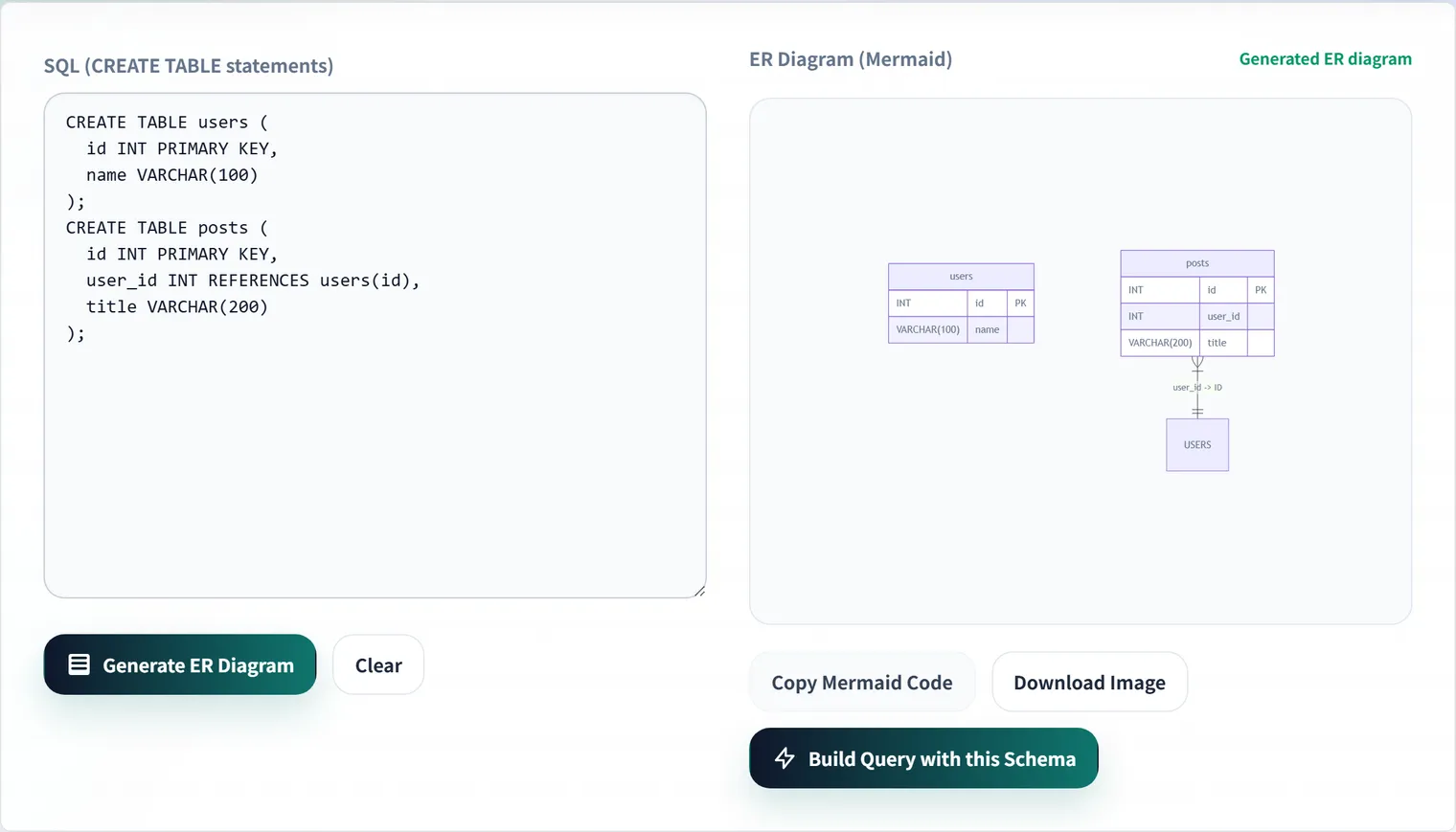
Everything runs entirely in your browser, so confidential schema information never leaves your machine. Generate the base diagram, then fine-tune it with the cheat sheet above. For a walkthrough of the tool itself, see How to generate an ER diagram from SQL DDL.
FAQ
What is the correct way to write a one-to-many relationship?
PARENT ||--o{ CHILD is the standard form (one parent, zero or more children). Use ||--|{ only when “at least one child must exist” is a real business rule you want the diagram to state. When in doubt, ||--o{ is the safe default.
Can I draw relationships without defining attributes?
Yes. erDiagram renders entities referenced in relationship lines even without {} blocks. A practical workflow is to sketch relationships only during early design, then add attribute blocks once the schema stabilizes.
Where can Mermaid ER diagrams be rendered?
GitHub (READMEs, issues, pull requests), GitLab, Notion, VS Code (with extensions), Obsidian, and most modern Markdown environments render Mermaid code fences natively. For anything else, export SVG/PNG via the Mermaid Live Editor.
Can a many-to-many relationship be implemented directly?
No — A }o--o{ B is a conceptual notation. Relational databases require a junction table (composite primary key plus two foreign keys), as shown in the e-commerce example above. Writing the resolved form into the diagram early saves rework at implementation time.