
Tools mentioned in this article
Open the browser-based tool while you read and try the workflow immediately.
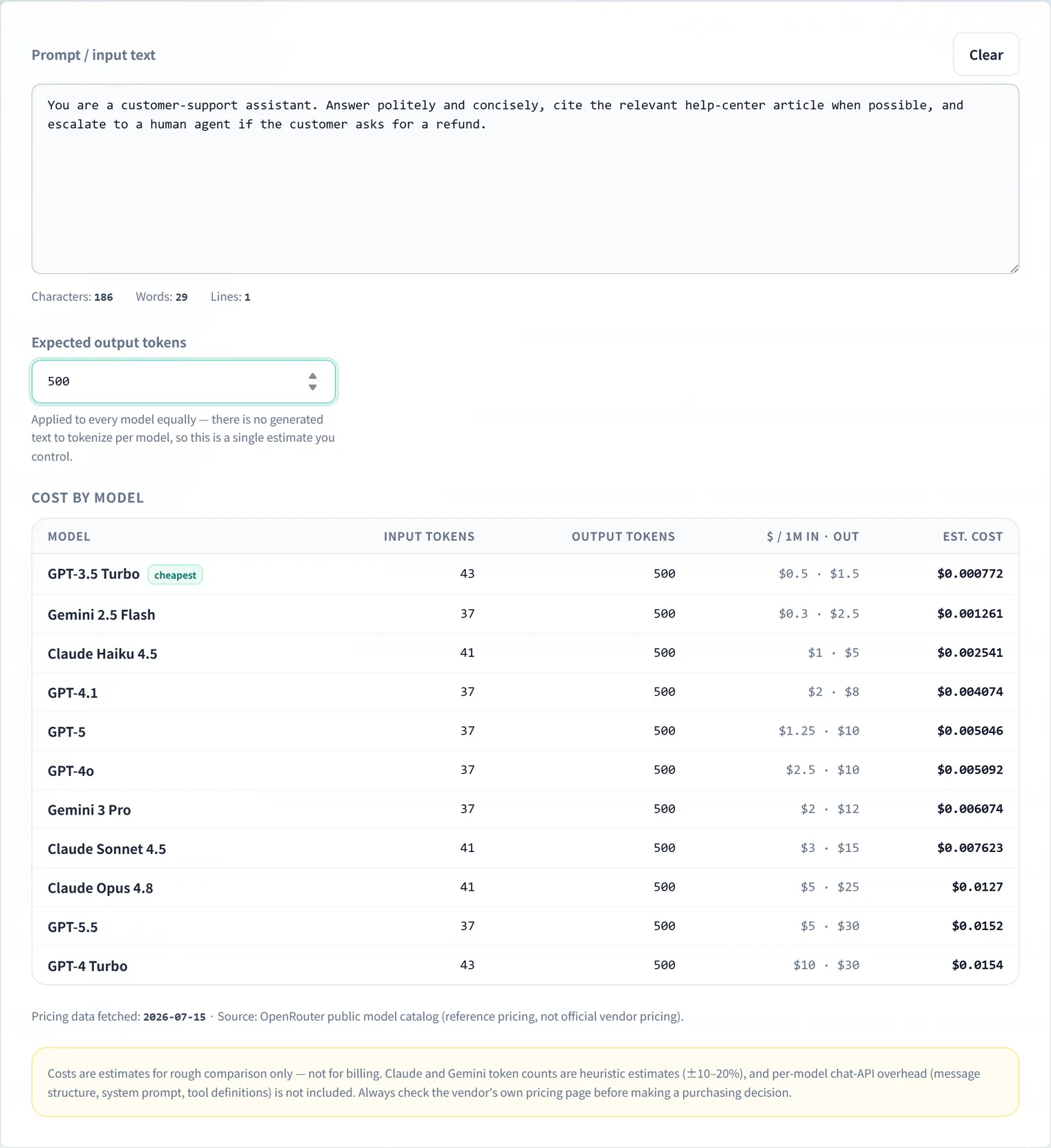
“If we move this prompt to GPT-5.5, what does the monthly bill look like?” “How much do we save dropping to a lighter model?” — model selection needs cost comparisons under identical conditions. The LLM API Cost Calculator takes a pasted prompt and an expected output length, and lists the per-request cost across the major Claude, GPT and Gemini models — entirely in your browser.
How LLM API pricing works
Across the major vendors, pricing shares one structure:
- Input (prompt) and output (generated text) are priced differently — output typically costs 3–5× more per token
- The billing unit is dollars per million tokens ($/1M tokens)
- Model tier changes the rate by orders of magnitude — flagship vs. lightweight models differ 10–100×
Estimating a request therefore means computing “input tokens × input rate + output tokens × output rate” for every model you’re considering. Doing that against vendor price pages with a calculator gets old fast — this tool does it in one shot.
How to use it
- Open the LLM API Cost Calculator and paste your prompt (system prompt plus a representative user input).
- Enter the expected output tokens (rough guides: 300–800 for a chat reply, 200–500 for a summary).
- The per-model cost table renders sorted cheapest first, with input/output cost breakdowns and each model’s $/1M rates.
Input tokens are computed from your prompt automatically. GPT models are counted exactly (o200k_base / cl100k_base); Claude and Gemini use character-mix estimates — the same estimation logic as the Token Counter.
Pricing data updates itself
Model prices change often. The rate table is fetched from a public pricing catalog at site build time and bundled as static data:
- At runtime (when you use the page) no network request is made — all math runs in your browser
- Your pasted prompt is never sent to a server
- The fetch timestamp for the rates is shown in the tool
What the estimate does not include
The numbers are per-request ballparks. Actual invoices are affected by:
- Prompt caching discounts — reusing a shared prefix can cut input costs dramatically; not modeled here
- Batch API discounts — asynchronous batch pricing (often 50% off) is not included
- Chat API overhead — message structure and tool definitions consume extra tokens beyond your pasted text
- Claude / Gemini counts are estimates — expect roughly ±10–20% error
For budget planning that has to be exact, check each vendor’s official pricing page and billing dashboard. For relative comparisons between models and getting the order of magnitude right, the calculator’s estimates are plenty.
FAQ
How accurate are the displayed costs?
GPT figures use exact tokenizers, so they’re accurate whenever the rate table is current. Claude and Gemini token counts are character-mix estimates with roughly ±10–20% error. For cross-model comparison and rough budgeting, that’s sufficient precision.
How fresh is the pricing data?
Rates are fetched automatically from a public pricing catalog when the site is built, and the fetch timestamp is displayed in the tool. Right after a vendor price change there can be a lag, so double-check official pricing pages before contractual decisions.
Are prompt caching or batch discounts factored in?
No. The estimates use undiscounted standard rates. If you use prompt caching or batch APIs, your real costs can be substantially lower than shown.
Is my pasted prompt sent anywhere?
No. Both token counting and cost math run entirely in your browser — prompts that can’t leave your organization are safe to estimate with.