
Tools mentioned in this article
Open the browser-based tool while you read and try the workflow immediately.
Getting from “roughly what I need” to a CREATE TABLE statement, fast
When you start a new feature, you usually already have a rough idea of the tables you’ll need. Writing that out as CREATE TABLE statements is simple in principle, but it eats more time than it should — recalling the right column type, looking up how MySQL and PostgreSQL syntax differ, getting a foreign key clause slightly wrong.
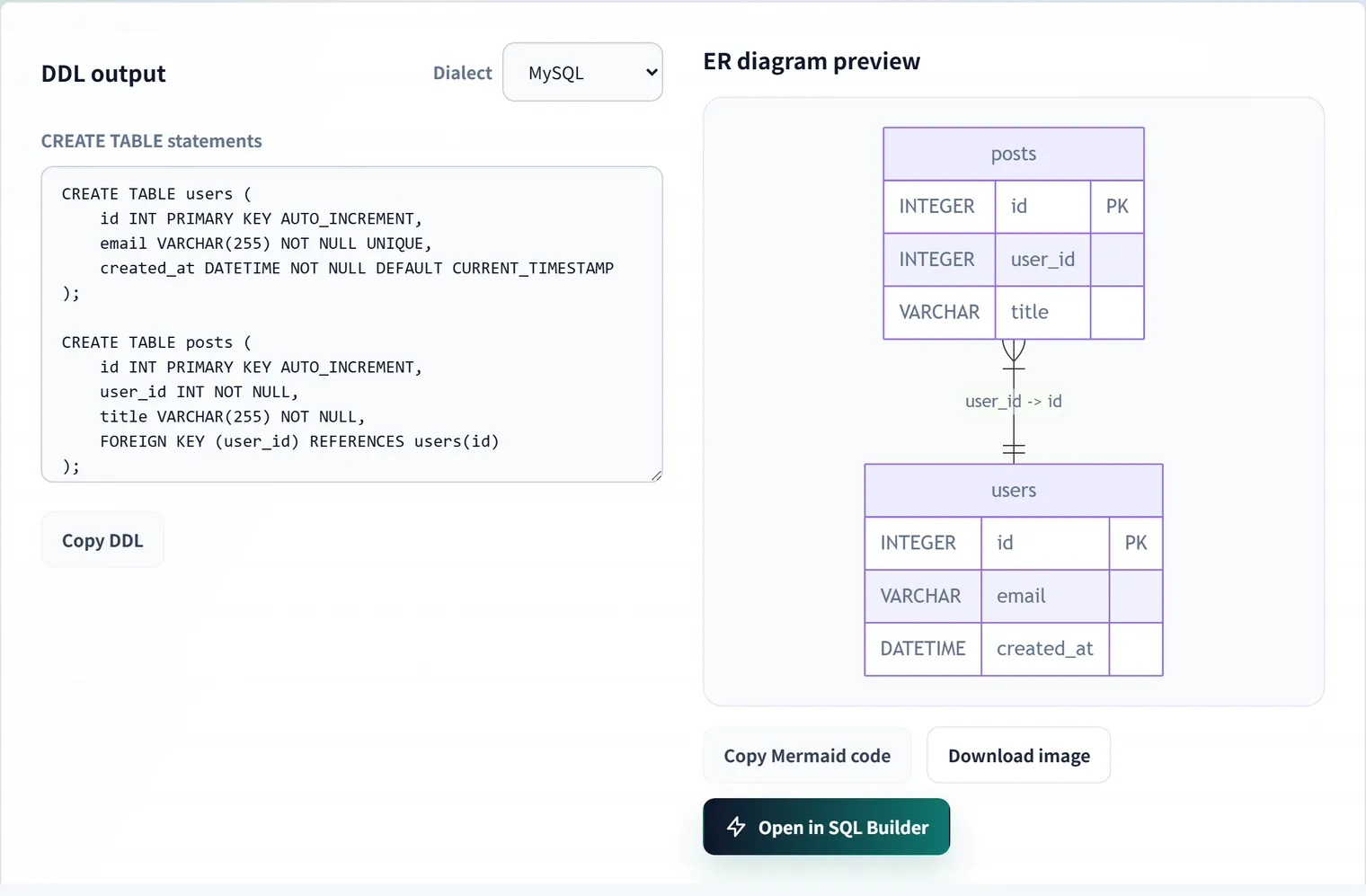
DDL Builder lets you assemble tables and columns on screen and generates CREATE TABLE statements formatted for MySQL, PostgreSQL, or SQLite, together with a Mermaid ER diagram — all at once. You can also paste a JSON sample to infer the column layout automatically. Everything runs in your browser; the table design you enter is never sent anywhere.
This article looks at what’s actually happening under the hood: how types get converted between dialects, and how columns get inferred from a JSON sample.
Three ways to build a table
DDL Builder gives you three ways to put a table together.
- Generate from JSON — paste a JSON sample from an API response or a log entry, and it infers column names, types, primary key, and NOT NULL automatically.
- Manual table design — edit the table name, column names, types, PK/NOT NULL/UNIQUE/auto-increment, and default values directly on screen.
- Relations — pick a from-table/column and a to-table/column to add a foreign key constraint and its connecting line in the ER diagram.
The DDL you generate can be handed straight off to Visual SQL Builder to start writing queries, or pasted later into SQL to ER Diagram to double-check the structure. The whole flow from design to querying stays inside the browser.
How types convert between databases
Internally, the tool keeps tables in a database-agnostic set of “logical types”:
export type LogicalType =
    | 'INTEGER' | 'BIGINT' | 'DECIMAL' | 'VARCHAR' | 'TEXT'
    | 'BOOLEAN' | 'DATE' | 'DATETIME' | 'JSON' | 'UUID';
Only when you actually generate DDL does it convert those into the real SQL types for the dialect you picked. The most interesting cases are where SQLite has no boolean or JSON type, and how auto-increment primary keys differ:
| Logical type | MySQL | PostgreSQL | SQLite |
|---|---|---|---|
BOOLEAN | BOOLEAN | BOOLEAN | INTEGER |
JSON | JSON | JSONB | TEXT |
UUID | CHAR(36) | UUID | TEXT |
| PK + auto-increment | INT ... AUTO_INCREMENT | SERIAL | INTEGER PRIMARY KEY AUTOINCREMENT |
The auto-increment primary key row diverges the most: PostgreSQL swaps the type itself for SERIAL (a sugar for INTEGER plus a sequence), while SQLite only gets a real auto-incrementing rowid alias when the column is declared exactly as INTEGER PRIMARY KEY. The tool absorbs those differences so you get syntactically correct output for whichever dialect you choose. If you’d rather write the dialects out by hand, the CREATE TABLE reference collects the type and constraint differences into cross-database cheat sheets.
One more detail: once a column is marked as the primary key, its NOT NULL, UNIQUE, and default-value settings are ignored — it’s emitted as just TYPE PRIMARY KEY, because a primary key is NOT NULL and UNIQUE by definition.
The logic behind inferring columns from a JSON sample
When you paste a JSON object (or array), each property’s value is used to infer a column type. Roughly, in priority order:
- All values are booleans →
BOOLEAN - All values are numbers →
INTEGERif every value is a whole number (orBIGINTif any exceeds 2^31), otherwiseDECIMAL - All values are strings →
DATETIMEfor ISO 8601 datetime strings,DATEfor date-only strings,UUIDfor UUID-formatted strings, otherwiseVARCHAR(orTEXTif any string is longer than 255 characters) - All values are plain objects →
JSON
If you pass an array, every item is used together for the inference. That lets the tool spot nullability (some values are null) and mixed types (a mix of integers and decimals, for example) that a single object alone wouldn’t reveal.
[
  { "id": 1, "nickname": "Alice", "score": 10 },
  { "id": 2, "nickname": null, "score": 10.5 }
]
Here, nickname drops NOT NULL because one row has null, and score is inferred as DECIMAL because the values mix integers and decimals.
Nested arrays of objects become related tables
When a top-level property’s value is an array of objects, the tool doesn’t just collapse it into a JSON column — it splits it out into its own table with a foreign key back to the parent.
{
  "id": 1,
  "name": "Order #1",
  "items": [
    { "product": "Widget", "qty": 2 },
    { "product": "Gadget", "qty": 1 }
  ]
}
Generating this JSON as orders produces a separate items table alongside it, with an items.orders_id → orders.id foreign key set up automatically — a one-to-many relationship like an order and its line items, built from a single piece of JSON. Nesting deeper than one level isn’t split automatically, so adjust those cases by hand after generating.
Round-tripping through SQL to ER Diagram to check the design
Export the tables you built as MySQL-dialect DDL and paste it into SQL to ER Diagram — the same tables, columns, and relationships come back out. It’s a useful round trip when you want to confirm the DDL you generated is valid, standard SQL, or when you want to revisit the design later.
FAQ
What happens to NOT NULL, UNIQUE, and the default value when a column is marked PK?
A primary key is NOT NULL and UNIQUE by definition, so once a column is marked PK, its NOT NULL/UNIQUE/default settings are ignored — it’s emitted as just “TYPE PRIMARY KEY” (plus AUTO_INCREMENT/SERIAL/etc. if auto-increment is on).
Can I use the generated DDL directly in a production migration?
This tool is meant as a starting point for table design or a review artifact — it doesn’t generate indexes, CHECK constraints, character sets/collations, or partitioning, which real deployments usually need. Always review the output and adjust it before using it in production.
What happens if a table name inferred from JSON collides with an existing one?
It automatically appends a suffix like _2 to avoid the collision — an existing table you built by hand is never overwritten.
If you’re not sure where to start on a table design, try pasting in a JSON sample you already have.
More free developer tools like this one are available at https://devtoolkits.app/