
Tools mentioned in this article
Open the browser-based tool while you read and try the workflow immediately.
The Problem Base64 Solves
Binary data — images, audio, executable files — is a stream of bytes with values ranging from 0 to 255. Many text-based protocols (email, HTTP headers, JSON, XML) were designed to handle only a subset of those values: printable ASCII characters. When binary data is passed through these systems without encoding, bytes outside the printable range get corrupted or misinterpreted.
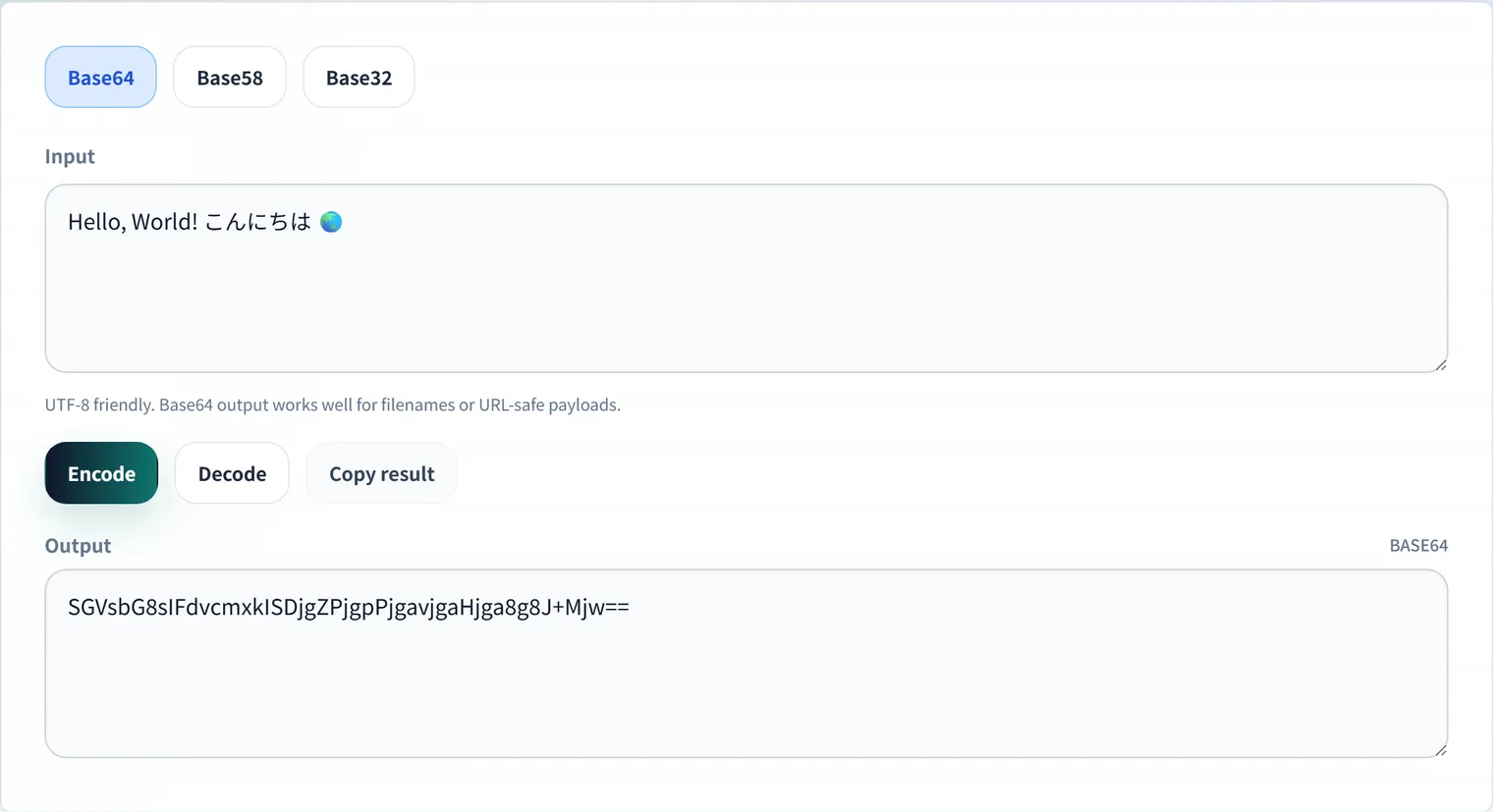
Base64 solves this by converting arbitrary binary data into a string that contains only safe, printable ASCII characters. The resulting string can be passed through any text-based system without corruption.
How Base64 Works Internally
Base64 uses a 64-character alphabet: A-Z (26), a-z (26), 0-9 (10), +, and / = exactly 64 characters, representable with 6 bits (2⁶ = 64).
The algorithm processes input 3 bytes (24 bits) at a time, splitting them into four 6-bit groups, then mapping each group to the alphabet:
Input bytes:     M         a         n
Binary:    01001101  01100001  01101110
                    ↓ regroup into 4 × 6 bits ↓
Groups:    010011  010110  000101  101110
Index:       19      22       5      46
Char:         T      W       F       u
Output:   T W F u
Padding
When the input length is not divisible by 3, padding characters (=) are appended to make the output a multiple of 4 characters:
- 1 remaining byte → 2 Base64 chars +
== - 2 remaining bytes → 3 Base64 chars +
= - 0 remaining bytes → no padding needed
"Ma"   (2 bytes) → "TWE="
"M"    (1 byte)  → "TQ=="
"Man"  (3 bytes) → "TWFu" (no padding)
The 33% Overhead
Because 3 bytes become 4 characters, Base64 always produces output that is approximately 4/3 = 133% of the input size. For a 100 KB image, the Base64 representation is ~133 KB.
This overhead matters when embedding images in HTML as data URIs or transmitting them in API requests. For large files, it is better to reference them by URL than to embed them as Base64.
Base64 Variants
| Variant | Alphabet difference | Padding | Common use |
|---|---|---|---|
| Standard Base64 | + and / | = | Email (MIME), general purpose |
| Base64Url | - and _ instead of + and / | Optional | URLs, JWT, cookies |
| Base64 (MIME) | Same as standard, with line breaks every 76 chars | = | Email attachments |
Why Base64Url Exists
Standard Base64 uses + and / which have special meaning in URLs (+ = space, / = path separator). Base64Url replaces these with - and _, producing strings safe for use directly in URLs, cookies, and HTTP headers — without percent-encoding.
JWTs use Base64Url for this reason: each of the three segments (header, payload, signature) is Base64Url-encoded, and the entire token is safe to use in an Authorization header or URL query parameter.
// Standard Base64 — may contain + / =
btoa('binary data with /')   // "YmluYXJ5IGRhdGEgd2l0aCAvCg=="

// Base64Url — safe for URLs
function toBase64Url(str) {
  return btoa(str)
    .replace(/\+/g, '-')
    .replace(/\//g, '_')
    .replace(/=+$/, '');  // optional: remove padding
}
Encoding and Decoding in Common Languages
JavaScript (Browser and Node.js)
// Encoding a string to Base64
const encoded = btoa('Hello, World!');
console.log(encoded); // "SGVsbG8sIFdvcmxkIQ=="

// Decoding
const decoded = atob('SGVsbG8sIFdvcmxkIQ==');
console.log(decoded); // "Hello, World!"

// For binary data (e.g., images) in Node.js
const buffer = Buffer.from(imageBytes);
const base64 = buffer.toString('base64');
const back = Buffer.from(base64, 'base64');

// Browser: encode binary from ArrayBuffer
async function arrayBufferToBase64(buffer) {
  const bytes = new Uint8Array(buffer);
  let binary = '';
  bytes.forEach(b => (binary += String.fromCharCode(b)));
  return btoa(binary);
}
Limitation of btoa: It only handles Latin-1 strings. For multi-byte Unicode (emoji, CJK characters), you must encode to UTF-8 bytes first:
function encodeUnicode(str) {
  return btoa(
    encodeURIComponent(str).replace(/%([0-9A-F]{2})/g,
      (_, p1) => String.fromCharCode(parseInt(p1, 16)))
  );
}
Python
import base64

# Encode
encoded = base64.b64encode(b'Hello, World!')
print(encoded)  # b'SGVsbG8sIFdvcmxkIQ=='

# Decode
decoded = base64.b64decode(b'SGVsbG8sIFdvcmxkIQ==')
print(decoded)  # b'Hello, World!'

# URL-safe variant
url_encoded = base64.urlsafe_b64encode(b'binary+data/here')
print(url_encoded)  # b'YmluYXJ5K2RhdGEvaGVyZQ=='  (+ and / replaced)
Go
import (
    "encoding/base64"
    "fmt"
)

// Standard encoding
encoded := base64.StdEncoding.EncodeToString([]byte("Hello, World!"))
fmt.Println(encoded) // SGVsbG8sIFdvcmxkIQ==

// URL-safe encoding (no padding)
urlEncoded := base64.RawURLEncoding.EncodeToString([]byte("Hello, World!"))
fmt.Println(urlEncoded) // SGVsbG8sIFdvcmxkIQ

// Decode
decoded, err := base64.StdEncoding.DecodeString(encoded)
Base58: Bitcoin’s Choice
Base58 uses 58 characters: all alphanumeric characters minus visually ambiguous ones: 0 (zero), O (capital O), I (capital I), and l (lowercase L). No +, /, or = either.
The goal: produce strings that humans can read, type, and copy without confusion — especially important for cryptocurrency addresses and paper wallet backups.
| Encoding | Characters | Padding | Human-readable? | Size overhead |
|---|---|---|---|---|
| Base64 | 64 | = | Confusing | ~33% |
| Base64Url | 64 | optional | Confusing in text | ~33% |
| Base58 | 58 | None | Yes | ~38% |
| Base58Check | 58+checksum | None | Yes | ~38% + checksum |
Base58Check (used by Bitcoin) appends a 4-byte checksum derived from SHA-256(SHA-256(payload)) before Base58 encoding. This allows detection of transcription errors.
Base32: The Human-Safe API Key Format
Base32 uses only 32 characters: A-Z and 2-7. Because it uses only uppercase letters and a restricted set of digits, it is particularly useful for:
- TOTP (Time-based One-Time Passwords): Google Authenticator secrets are Base32-encoded.
- Case-insensitive systems: File systems or identifiers where case cannot be preserved.
- Oral/manual entry: Fewer ambiguous characters than Base64.
The trade-off: Base32 is less compact. Every 5 bytes become 8 characters (60% overhead vs. Base64’s 33%).
import base64

# Base32 encoding of a TOTP secret
secret = b'\x87\x65\x43\x21'
encoded = base64.b32encode(secret)
print(encoded)  # b'Q5SUEG=='

# Decode
decoded = base64.b32decode(b'Q5SUEG==')
When to Use Which Encoding
| Use case | Recommended encoding |
|---|---|
| Email attachments (MIME) | Standard Base64 |
| JWT tokens | Base64Url |
| URL query parameters | Base64Url |
| Data URIs in HTML/CSS | Standard Base64 |
| Bitcoin/crypto addresses | Base58Check |
| TOTP secrets (Google Authenticator) | Base32 |
| API keys intended for human copying | Base58 or Base32 |
| File checksums in URLs | Base64Url |
FAQ
Does Base64 provide any security?
No. Base64 is encoding, not encryption. Anyone who receives a Base64 string can trivially decode it. Never use Base64 as a way to “hide” sensitive data.
Why do JWTs use Base64Url without padding?
JWTs omit the = padding characters to make the token even more URL-safe (padding = requires percent-encoding in URLs). The receiving end infers the padding length from the string length. Most JWT libraries handle this automatically.
Can I encode an entire file in Base64?
Yes, but consider the overhead. A 1 MB binary file becomes approximately 1.37 MB as Base64. For large files, it is usually better to upload the file directly and reference it by URL. Base64 embedding is practical for small assets like favicons (a few KB) embedded in HTML or CSS.
What does data:image/png;base64,... mean?
It is a data URI — a way to embed a file’s contents directly in an HTML or CSS file. The browser decodes the Base64 and uses the result as if it had fetched the image from a URL. Small icons (under ~1 KB) are reasonable candidates for this technique; larger images should remain as separate files.
Is there a Base128 or Base256?
Encoding at higher bases is possible but not useful — once you exceed 94 printable ASCII characters (Base94), adding more characters introduces ambiguity with control characters or requires multi-byte encodings, which defeats the purpose. Base64 is the sweet spot between compactness and universality.