
Tools mentioned in this article
Open the browser-based tool while you read and try the workflow immediately.
The rules file sprawl problem
Adopt a couple of AI coding agents and your repository root starts looking like this:
CLAUDE.md                          ← Claude Code
.cursor/rules/project.mdc          ← Cursor
.github/copilot-instructions.md    ← GitHub Copilot
.windsurfrules                     ← Windsurf
GEMINI.md                          ← Gemini CLI
AGENTS.md                          ← the emerging cross-agent standard
The content is nearly identical in every file: project overview, tech stack, how to run tests, coding conventions, things the agent must never touch. Yet each tool reads its own path, so every rule change means editing five or six files — and one of them always falls behind. When “Copilot accepted this but Claude Code refused it” happens on your team, stale rules are usually why.
This guide covers where each agent looks for rules, what content actually improves agent behavior, and a workflow that keeps every file generated from a single source.
Where each agent reads its rules
| Agent | File | Format notes |
|---|---|---|
| Cross-agent standard | AGENTS.md | Plain Markdown; support is spreading across tools |
| Claude Code | CLAUDE.md | Plain Markdown |
| Cursor | .cursor/rules/*.mdc | Markdown with YAML frontmatter (see below) |
| GitHub Copilot | .github/copilot-instructions.md | Plain Markdown |
| Windsurf | .windsurfrules | Plain Markdown |
| Gemini CLI | GEMINI.md | Plain Markdown |
The key observation: five of the six are plain Markdown with different filenames. The content can be identical — only Cursor needs extra metadata. That makes a “write once, derive everything” workflow practical.
The one exception: Cursor’s MDC frontmatter
Cursor’s modern format (.cursor/rules/*.mdc) prepends YAML frontmatter that declares when the rule applies:
---
description: Project-wide rules for AI coding agents
globs:
alwaysApply: true
---
alwaysApply: true is what you want for project-wide rules. For rules scoped to part of the codebase, set globs: src/api/** instead and split them into separate .mdc files.
What actually belongs in a rules file
Not all sections pull equal weight. Ordered by impact:
| Section | Why it matters |
|---|---|
| Commands (dev / build / test / lint) | Lets the agent verify its own changes by running tests instead of guessing |
| Do-nots | Prevents incidents: “never edit migrations directly”, “never commit to main” |
| Project overview | Reduces wrong assumptions baked into generated code |
| Tech stack | Stops imports of libraries you don’t use |
| Directory structure | The agent finds and places files correctly |
| Coding conventions | Fewer review round-trips |
In practice the two winners are commands and do-nots. An agent that knows npm test will run it after changes and fix its own mistakes; an explicit do-not list turns “did it, got yelled at” into “never did it”.
A copy-paste template
# my-project

This file provides guidance to AI coding agents (Claude Code, Cursor,
GitHub Copilot, Windsurf, Gemini CLI, etc.) working in this repository.

## Project Overview

Internal dashboard for order management. Astro frontend, REST API backend.

## Tech Stack

- TypeScript
- Astro
- Tailwind CSS
- Vitest

## Commands

- Dev server: `npm run dev`
- Build: `npm run build`
- Test: `npm run test`
- Lint: `npm run lint`

## Coding Conventions

- Prefer pure functions in `src/lib/`; keep DOM access in components
- All user-facing strings go through the i18n helper

## Do Not

- Do not edit files under `db/migrations/` directly
- Do not add new runtime dependencies without discussion
Save it as AGENTS.md, then copy the same body into each agent-specific path (adding the MDC frontmatter for Cursor).
Keep it short — rules ride along on every request
An easy thing to miss: the rules file is injected into nearly every conversation with the agent. A bloated rules file costs tokens on every request and buries the instructions that matter.
- Don’t paste in things the agent can discover itself (it can read your README and your code)
- Skip conventions that are obvious from the codebase; write down only constraints the code can’t express
- Prune regularly — delete rules that no longer hold
Rules files that work best in practice tend to sit around 50–100 lines.
Generating all formats at once
Maintaining six copies by hand invites drift, which defeats the purpose. The AI Rules Generator takes one form input — overview, stack, commands, conventions, do-nots — and emits every file at once: AGENTS.md, CLAUDE.md, .cursor/rules/project.mdc (with frontmatter), .github/copilot-instructions.md, .windsurfrules, and GEMINI.md, all derived from the same body.
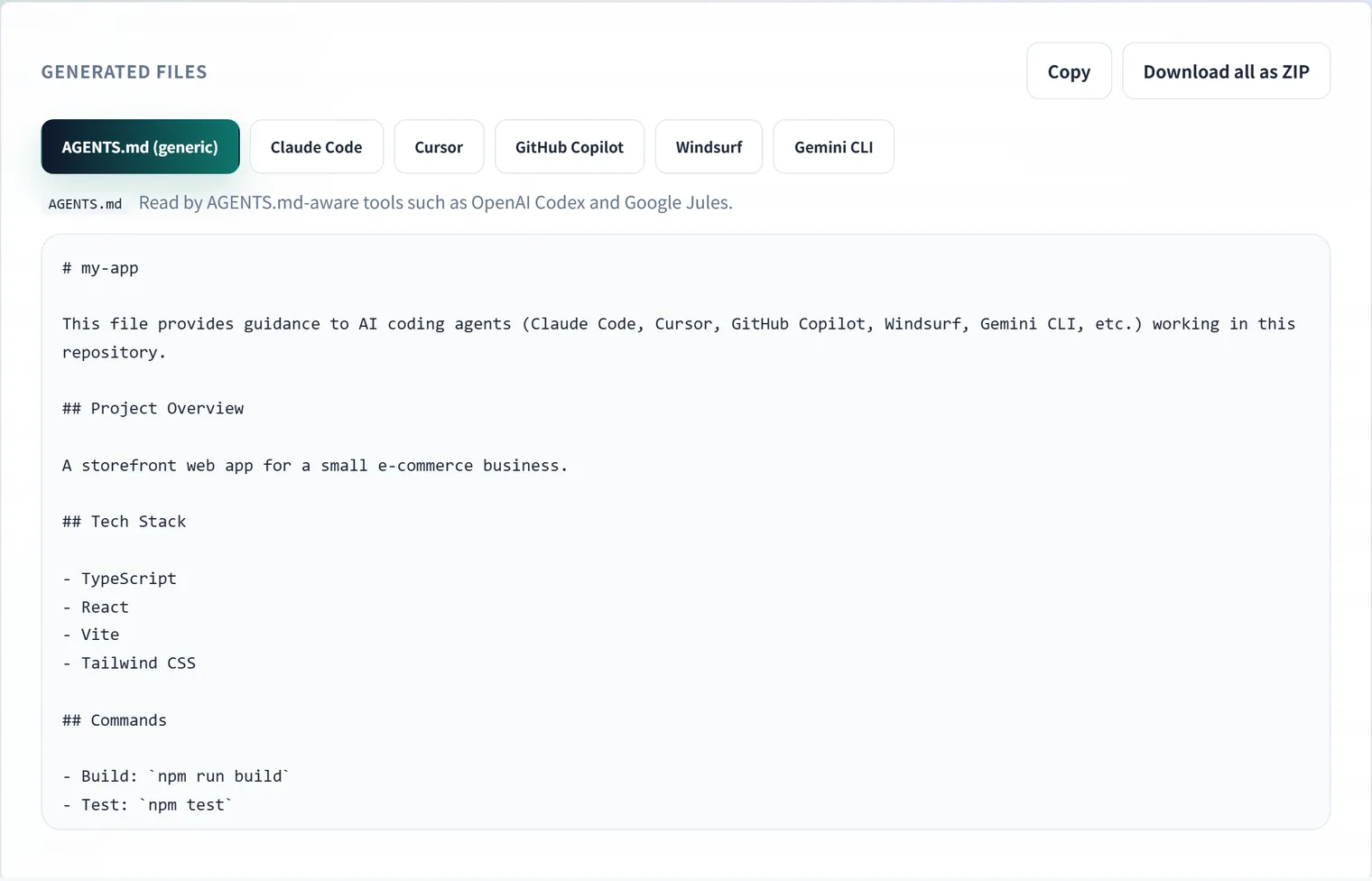
It runs entirely in your browser — project details never leave your machine. When rules change, regenerate and overwrite: the files can’t drift because they share one source.
FAQ
Should I use AGENTS.md or the tool-specific files?
Both, derived from the same content. AGENTS.md is the portable standard and a growing number of tools read it natively, but support is still uneven — shipping the tool-specific copies alongside it is the pragmatic choice today. Some teams symlink CLAUDE.md to AGENTS.md instead of copying; that works where symlinks are practical (less so on Windows or in some CI environments).
What is the difference between .cursorrules and .cursor/rules?
.cursorrules (a single file in the repo root) is Cursor’s legacy format. The current format is a directory of .mdc files under .cursor/rules/, each with frontmatter controlling when it applies (alwaysApply, globs, or agent-requested via description). New projects should use .cursor/rules/.
How long should a rules file be?
Long enough to state your commands, hard constraints, and non-obvious conventions — and no longer. Around 50–100 lines is a good target. Remember it is prepended to nearly every agent request: every extra line is a recurring token cost and dilutes the important instructions.
Can I have different rules for different parts of the repository?
Yes, two ways. Cursor scopes rules with globs: in the MDC frontmatter. Claude Code and several AGENTS.md-aware tools also read nested rules files (for example a CLAUDE.md inside a subdirectory) that apply when working in that directory. Keep the root file for project-wide rules and push directory-specific constraints down to where they apply.