
Tools mentioned in this article
Open the browser-based tool while you read and try the workflow immediately.
Kubernetes manifests are usually split across files for the Ingress, Service, Deployment and ConfigMap, so it is hard to see what actually connects to what. The output of kubectl get has many lines and hides the whole picture.
The Kubernetes Manifest Visualizer draws Ingress → Service → Pod → ConfigMap / Secret / PVC from pasted YAML. It never connects to a cluster and works only in your browser.
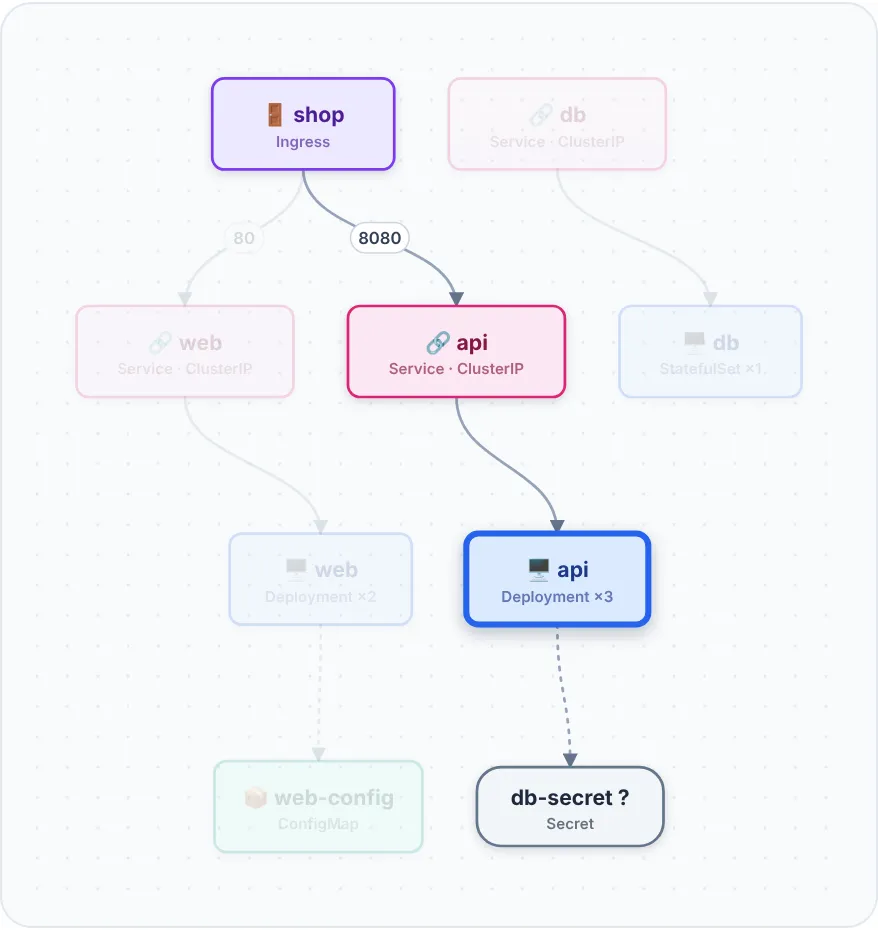
How connections are decided
- Ingress → Service: via
rules[].http.paths[].backend.service.name(anddefaultBackend) - Service → Pod: Pods whose template labels contain every label of the Service’s
selector(same namespace only). Most “I created a Service but it does not connect” problems are a label mismatch here - Pod → ConfigMap / Secret / PVC / ServiceAccount: references in
env,envFrom,volumesandserviceAccountName, drawn as dotted lines - HPA → target and StatefulSet → its serviceName Service are connected too
A reference that is not in the pasted manifests appears as a node marked ”?”, so a typo or a forgotten file is easy to spot.
What is checked
| Check | What happens |
|---|---|
| No Pod matches the selector | The Service has empty Endpoints |
No container port matches targetPort |
Connections fail |
| Referenced ConfigMap, Secret or PVC is missing | The Pod cannot start |
| Deployment selector does not match template labels | It cannot be deployed |
latest or untagged image |
What you pull changes over time |
No resources.limits or readinessProbe |
One container can use up the node; traffic reaches unready Pods |
| Password written directly in env | Should move to a Secret |
This is a mechanical check, so intended settings can be reported too.
More tools like this
There are other “paste a config and get a diagram” tools. All of them run only in your browser.
- Docker Compose Visualizer: connections through
depends_on, volumes and networks, with checks for port conflicts and plain-text passwords - Terraform Visualizer: references among resources, data sources and modules, with checks for open ingress and plain-text passwords
- OpenAPI Visualizer: endpoints, schemas and
$reflinks, with unused schemas and authentication marks - tsconfig Visualizer: extends inheritance and references, with effective options, referenced projects without composite and overlapping include
FAQ
Does it connect to my cluster?
No. It reads the pasted YAML only in your browser and sends nothing to a server. Do not paste Secret values.
Can it read Helm or Kustomize output?
Yes, the YAML printed by helm template or kustomize build. Templates that still contain template syntax cannot be read.
Summary
- Drawing manifests from Ingress to Pods reveals broken connections
- Whether a Service reaches a Pod depends on label containment between selector and Pod labels
- Missing references,
latest, missing limits and probes can be checked just by pasting - Everything runs in your browser; it never connects to a cluster