
Tools mentioned in this article
Open the browser-based tool while you read and try the workflow immediately.
“What runs when I run npm run build?”
As the scripts of a package.json grow, it gets hard to follow chains such as build calling compile and bundle, prebuild running clean and postbuild printing a report.
The npm scripts Flow Diagram takes your scripts and draws how scripts call each other and the pre / post hooks, and lists the order in which things run.
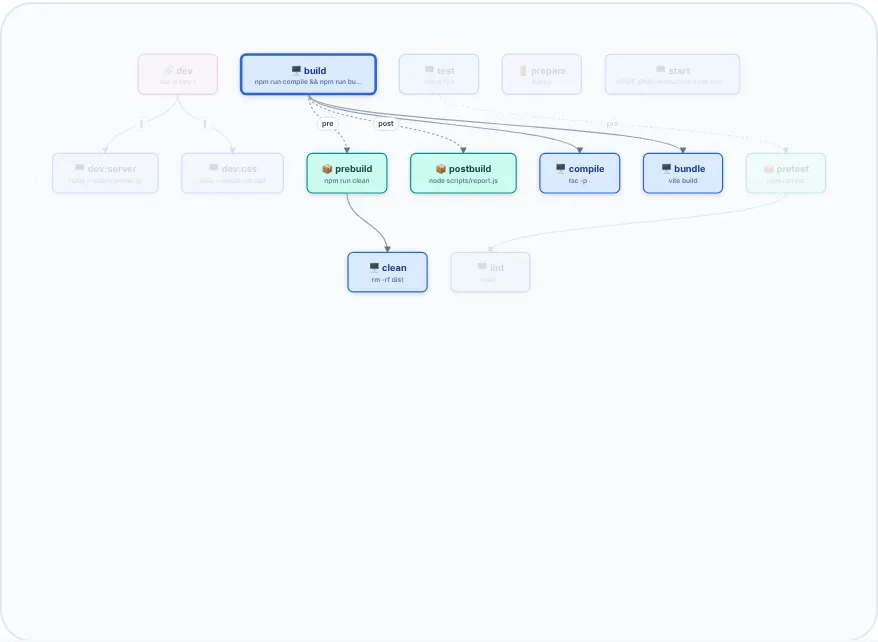
Reading the diagram
- Scripts are nodes and “calls when run” is an arrow. Under each node is the start of its command
- Dotted lines are
pre/posthooks, running frombuildtoprebuildandpostbuildwith a label - ”∥” marks calls that run in parallel (
run-p,npm-run-all --parallel,concurrently,&) - Colors tell ordinary scripts, hooks, scripts npm runs automatically (
prepare,install,publish…), scripts with parallel calls and missing scripts apart
It reads npm run x (run-script), npm test / start / stop, yarn x / pnpm x (when a script of that name exists), run-s / run-p / npm-run-all and concurrently "npm:watch-*". Patterns such as build:* are expanded to the scripts that exist. The lifecycles run by npm ci or npm publish are expanded only when those scripts exist.
The run order list
Pick a script in “Run order”. For npm run <name>, it lists what runs in what order, expanded by these rules:
pre<name>(if any)- The body. Each part joined by
&&in turn; scripts called withnpm runare expanded recursively, including their own pre / post post<name>(if any)
Missing scripts and cycles are marked in place and stop there.
What it checks
| Check | What it means |
|---|---|
| Missing script | npm run zzz is written, but there is no zzz |
| Cycle | It loops back, like a → b → a, and never finishes |
| Hook without a matching script | prelint exists but lint does not (names that are not hooks, such as preview, are excluded) |
prepublish |
Deprecated, and also runs on npm install. Use prepare or prepublishOnly |
| Leading environment variable | NODE_ENV=production webpack does not work in Windows cmd or PowerShell. Use cross-env |
| Unix commands | rm -rf, cp, mv, mkdir -p and similar do not work on Windows. Use Node tools such as rimraf |
Shell syntax is not fully parsed. It splits on &&, ||, ; and & and reads only the call at the start of each part, so things can be missed and some findings may be intended. Treat the diagram as the rough structure.
FAQ
Is my package.json sent to a server?
No. It is processed only in your browser and never sent to a server.
Does it show scripts run by npm install?
Yes. preinstall, install, postinstall, prepare and so on, run by npm ci or npm install, are expanded as things called from the script, only when those scripts exist.
Does it run anything to check?
No. It does not run scripts or inspect what the commands do. It only looks at the structure of calls.
Summary
- Calls, hooks and parallel runs in
scriptscan be checked as a diagram and a run-order list pre/postrun only when the matching script exists, including inside called scripts- Windows-breaking syntax, cycles and calls to missing scripts can be checked before running anything
- Everything is processed in your browser