
Tools mentioned in this article
Open the browser-based tool while you read and try the workflow immediately.
exports is hard to write and hard to read
The exports field of package.json decides which paths a package exposes. Because conditions such as import, require, types and browser combine with subpaths such as ./feature and ./utils/*, it is hard to tell which file a given import ends up with.
The package.json exports Resolver takes a package.json and shows which file import 'pkg' or import 'pkg/feature' resolves to, for Node.js, bundlers and TypeScript.
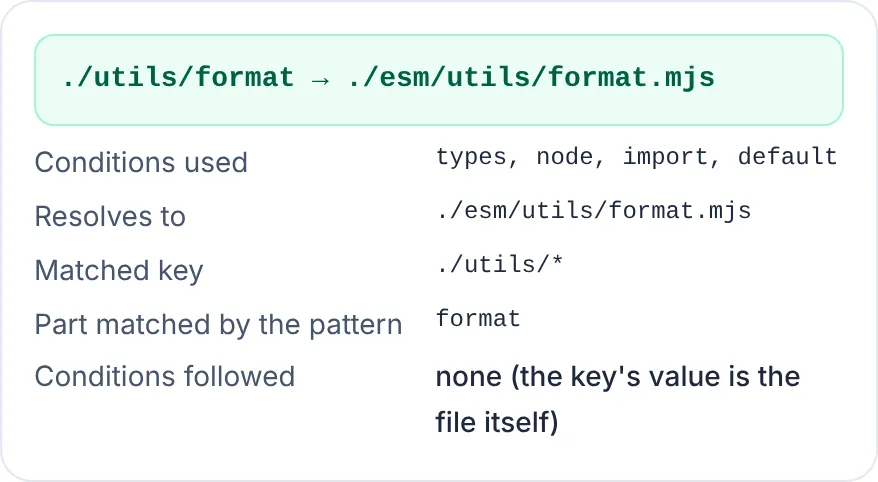
How it resolves
It follows the Node.js algorithm.
- Look for a key that exactly matches the subpath (
.or./feature) - If there is none, try the pattern keys containing
*, most specific (longest base) first (./features/private/*before./features/*) - If the value is an object of conditions, take the first one in written order that matches the conditions in use (or
default) - If the value is an array, skip values it cannot use and take the next candidate
- If the value is
null, the path is blocked (ERR_PACKAGE_PATH_NOT_EXPORTED)
The result shows the resolved file, the matched key, the conditions followed (such as import) and the part matched by a pattern. When it cannot resolve, the reason is shown: not exported, no condition matches, or blocked by null.
Paths starting with # (internal paths from imports, such as import '#config') are resolved by the same steps. A value can be a file of this package or the name of another package (an external dependency).
Condition sets
| Set | Conditions used |
|---|---|
| Node.js (import) | node, import |
| Node.js (require) | node, require |
| Bundler (browser) | import, module, browser |
| TypeScript (import / require) | types, node, import / require |
default is always used. Real tools also use conditions such as development, production and style, so “Custom” lets you list conditions and check.
Writing problems it checks
typesafter other conditions: TypeScript reads from the top, so withimportfirst it never reachestypesdefaultnot last: anything after it is not usedrequirepointing at.mjs: older Node.jsrequirecannot load itimportandrequirepointing at different files: if both get loaded, the same library can run twice (the dual package hazard)./package.jsonnot exported: tools that read the version can no longer read it- A target not starting with
./: invalid - No type definitions: TypeScript treats the package as untyped
The table of all subpaths × condition sets also reveals unintended blocking.
Without exports
Without exports, it looks for an entry in main (or index.js), module, browser and types. Since Node.js 12.7, main is ignored when exports exists.
FAQ
Is my package.json sent to a server?
No. It is processed only in your browser and never sent to a server.
Why is types after import a problem?
TypeScript reads the conditions from the top and uses the first that matches. If import comes first, it stops there and never reaches types. Put types first.
Is the result exactly the same as in real bundlers?
It follows the Node.js algorithm, but bundlers and TypeScript can use their own conditions, extension completion and typesVersions. Check with the real tool in the end.
Summary
exportsresolve in this order: subpath match → pattern → conditions (in written order) → array →null- Mistakes in condition order (
typeslast,defaultnot last) are easy to miss - The table of all subpaths × conditions finds unintended blocking before you publish
- Everything is processed in your browser