
Tools mentioned in this article
Open the browser-based tool while you read and try the workflow immediately.
Once an OpenAPI YAML has dozens of endpoints, it gets hard to tell where a schema is used or which endpoints a rename would affect.
The OpenAPI Visualizer draws endpoints (by tag) → schemas → the $ref links between schemas from a pasted spec. It runs only in your browser.
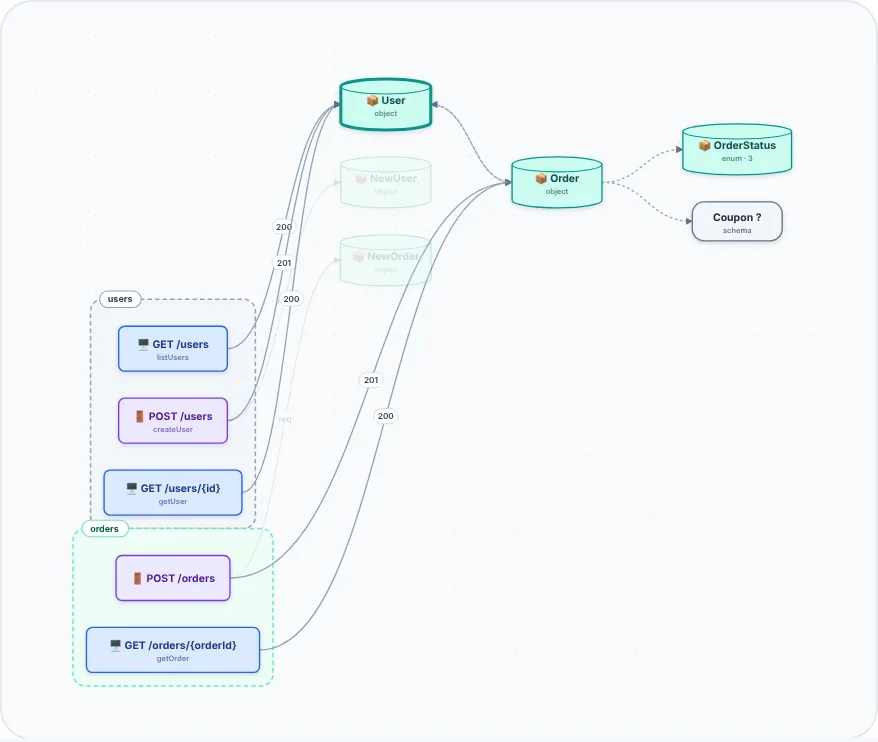
Reading the diagram
- Endpoints (such as
GET /users) sit in a frame per tag - Solid lines go from an endpoint to the schemas it uses.
reqis the request and numbers (200,404) are response statuses - Dotted lines go from a schema to the schemas it references (
$ref) - A schema whose target is not in
componentsappears as a node marked ”?”
A spec that shares requestBodies or responses through $ref is followed into those too.
What is checked
| Check | What happens |
|---|---|
$ref target is missing |
Client generation or validation fails |
| Schema that nothing uses | Leftovers stay in the spec |
Duplicate operationId |
Generated clients get conflicting function names |
Path {id} not declared as in: path |
The spec is invalid |
| No success (2xx) or default response | Clients cannot tell what success is |
Circular $ref |
Check that a recursive structure is intended |
This is a mechanical check, so intended settings can be reported too.
More tools like this
There are other “paste a config and get a diagram” tools. All of them run only in your browser.
- Docker Compose Visualizer: connections through
depends_on, volumes and networks, with checks for port conflicts and plain-text passwords - Kubernetes Manifest Visualizer: Ingress → Service → Pod → ConfigMap / Secret connections, with checks for selector mismatches, NetworkPolicy and PDB
- Terraform Visualizer: references among resources, data sources and modules, with checks for open ingress and plain-text passwords
- tsconfig Visualizer: extends inheritance and references, with effective options, referenced projects without composite and overlapping include
FAQ
Can it read $ref to other files?
Yes. Paste the files separated by --- # file: ./common.yaml lines and references to the other files connect in the diagram too (the first file is the main spec). References to files or URLs that are not pasted cannot be read.
Is my spec sent to a server?
No. It is processed only in your browser.
Summary
- Drawing the spec shows a schema’s impact by following the lines
- Missing references, unused schemas, duplicate
operationIdand undeclared path parameters are checked just by pasting - Narrow large specs by “Tag”
- Everything runs in your browser