
Tools mentioned in this article
Open the browser-based tool while you read and try the workflow immediately.
“Why is this package installed?”
npm ls qs prints so many lines that it is hard to follow. In node_modules, the same package shows up in several places. With hundreds or thousands of dependencies in a package-lock.json, these questions are hard to answer by eye.
The npm Dependency Graph turns a package-lock.json (pasted or loaded as a file) into a graph and shows the path from the root to the package you are looking for.
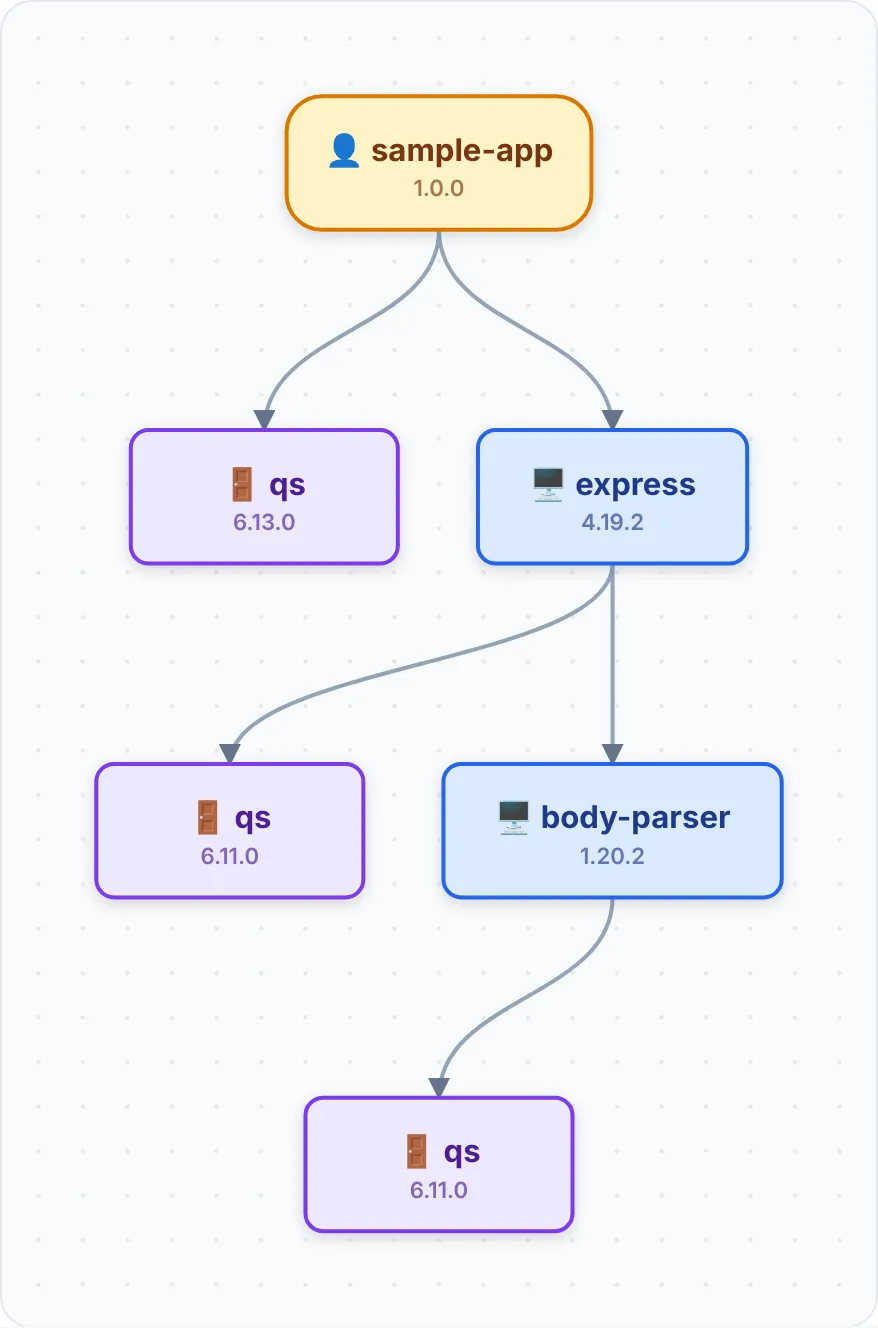
Learn “why” from a path
Enter a package name in “Why is it installed?”. Versions and scoped names such as qs, [email protected] and @babel/core all work.
- It follows the shortest path from the root and shows it as text too, like
your project → express → body-parser → qs - When the same name is installed in several versions, each path is shown, closest to the root first
- Packages reachable only through
devDependenciesare marked “dev only” - The graph draws only the nodes on that path, and the package you searched for changes color
Once you know the path, you know which direct dependency to upgrade or remove to get rid of the package.
Reading the graph
- It draws the root and its dependencies down to the chosen depth (1 to 4 levels). Solid lines are production dependencies; dashed lines are
devDependenciesand optional dependencies - Colors distinguish the project, production dependencies, dev-only, optional, names installed in several versions, and the package you searched for
- The version is written under each node. Click it to see its location (
node_modules/…), source, dependencies and what requires it - When there are too many nodes, up to the limit (80) are drawn and the number left out is shown. Reduce the depth or narrow it down by name
What it checks
From what the lock records, it finds:
| Check | What it means |
|---|---|
| Several versions | The same name is installed in different versions (npm dedupe can sometimes reduce them) |
| Install scripts | The package runs a script at install time (hasInstallScript) |
| Deprecated | Recorded as deprecated |
| Source | Fetched over http instead of https, or from git |
| Unreachable packages | Cannot be reached from the root’s dependencies (they may only be left over in the lock) |
It also shows the package count, distinct names, direct dependencies, dev-only count, maximum depth, the deepest path and the most depended-on packages.
Supported lock files
npm’s package-lock.json (lockfileVersion 1, 2 and 3) is supported, and so is yarn.lock (classic and Berry; pnpm-lock.yaml is not). lockfileVersion 1 and yarn.lock do not record the root’s direct dependencies, so top-level packages that nothing else requires are treated as direct dependencies.
The registry is not queried, so latest versions, vulnerabilities and licenses are not shown. Use npm audit or similar for vulnerabilities.
The file is read only in your browser
The pasted file is read only in your browser. It is not sent to a server and not stored in this browser either.
FAQ
Is my lock file sent to a server?
No. The file is read only in your browser and never sent to a server. It is not stored in this browser either.
Can it read yarn.lock or pnpm-lock.yaml?
yarn.lock (classic and Berry) can be read, and so can pnpm-lock.yaml (v6 and v9). yarn.lock records no dev-only flag, install scripts or deprecations, so those checks do not appear.
Does it show latest versions or vulnerabilities?
No. The registry is not queried, so the check uses only what the lock records: install scripts, deprecation notes, sources and versions.
Does it work with a huge lock file?
Locks of tens of thousands of lines can be read, but at most 80 nodes are drawn. Reduce the depth or narrow it down by package name to draw just the part you want. Numbers such as the package count and duplicates are counted over the whole lock.
Summary
- Paste a
package-lock.jsonand get a dependency graph plus the path from the root - Duplicated versions, install scripts, deprecations and http / git sources come from the lock alone
- npm lock files (v1 to v3) are supported; latest versions and vulnerabilities are not checked
- Everything is processed in your browser and the file is not stored