
Tools mentioned in this article
Open the browser-based tool while you read and try the workflow immediately.
Lock diffs are hard to read
In a PR that updates dependencies, package-lock.json changes by thousands of lines. Reading the raw diff, you can barely tell what was upgraded, whether there are major updates, or what moved among indirect dependencies.
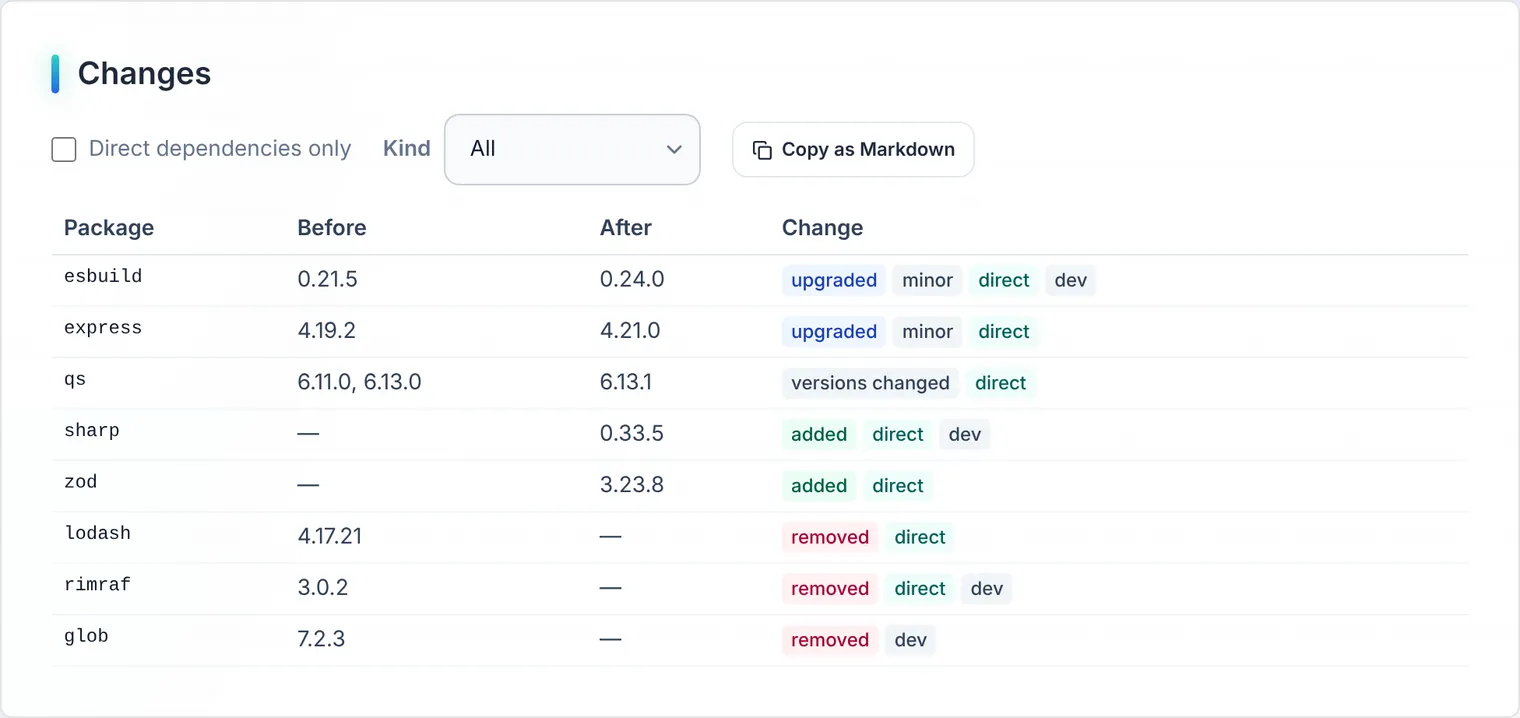
The package-lock.json Diff Summarizer takes the lock from before and after and tabulates added, removed, upgraded and downgraded packages, split into major / minor / patch.
What is compared
Packages are compared by name, looking at which versions are installed before and after.
- One version replaced by another: “upgraded” or “downgraded”, with major / minor / patch (or prerelease)
- A name that appeared or disappeared: “added” or “removed”
- Anything else, such as several versions being tidied up: “versions changed”, with the versions before and after side by side
A difference only in the nested location (node_modules/a/node_modules/b) does not count as a change. The table puts direct dependencies first, then downgrades, upgrades (major first), additions and removals.
Changes to direct dependencies
Additions, removals and range changes (^4.19.0 → ^4.21.0) of packages in package.json go in a separate table. You can read “what I changed” apart from “how indirect dependencies moved as a result”.
Checks
From what the lock records, it finds:
| Check | What it means |
|---|---|
| Hash changed with the same version | integrity changed. It may be a republish, a change of source or tampering, so it needs checking |
| New install script | A package newly has hasInstallScript |
| Newly deprecated | Newly recorded as deprecated |
| Newly fetched over http or from git | More sources that are not https |
| Version went down | A downgrade. Check that it is intended |
lockfileVersion changed |
A different npm version can make the diff look larger |
These checks do not look at what changed inside the packages (the code diff). The registry is not queried; only versions, hashes and sources recorded in the lock are used.
Paste it into a PR
“Copy as Markdown” copies the table of changes (package, before, after, change) as a Markdown table, with direct dependencies marked. Paste it straight into a PR description or release notes.
FAQ
Are my lock files sent to a server?
No. They are read only in your browser and never sent to a server. They are not stored in this browser either.
What does “hash changed with the same version” mean?
The lock records a file hash alongside each package’s version. A hash that changes while the version stays the same is not normal. It can mean a republish, a change of source or tampering, so please check.
Can it compare yarn.lock or pnpm-lock.yaml?
yarn.lock (classic and Berry) can be compared, and so can pnpm-lock.yaml (v6 and v9). yarn.lock records no install scripts or deprecations, so those checks do not appear.
Summary
- A lock diff of thousands of lines becomes a table of added, removed, upgraded and downgraded packages
- Changes to direct dependencies can be read apart from how indirect ones moved
- Hash changes with the same version, new install scripts and more are checked
- Everything is processed in your browser and the files are not stored