
Tools mentioned in this article
Open the browser-based tool while you read and try the workflow immediately.
Why Hash Functions Matter
Every time a user creates an account, your system faces a fundamental question: how do you store their password? The naive answer — saving it as plain text — has caused some of the largest data breaches in history. A hash function is the foundation of the correct answer.
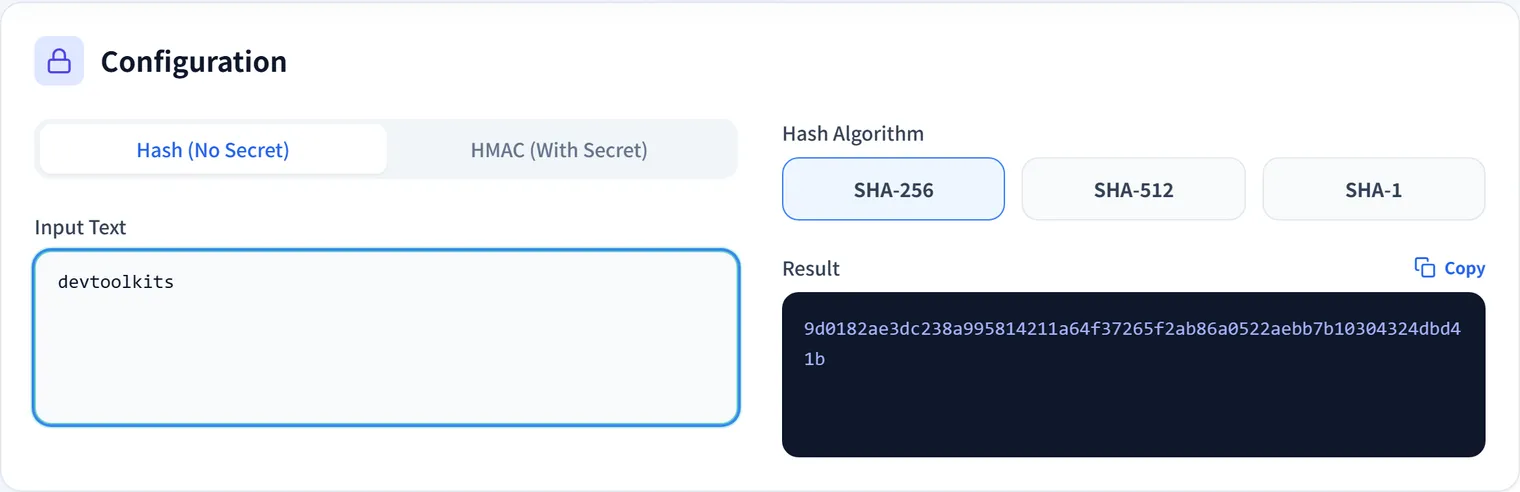
A cryptographic hash function transforms an input of any length into a fixed-length output (the “digest” or “hash”) with three critical properties:
- Deterministic: The same input always produces the same output.
- One-way: Given the output, it is computationally infeasible to recover the input.
- Avalanche effect: A tiny change in input (even a single bit) completely changes the output.
These properties mean you can store only the hash, not the password itself. When a user logs in, you hash their input and compare it to the stored hash. If they match, the password is correct — without you ever knowing the original password.
Hash Algorithm Comparison
Not all hash algorithms are created equal for security purposes.
| Algorithm | Output size | Speed | Use for passwords? | Current status |
|---|---|---|---|---|
| MD5 | 128-bit | Very fast | Never | Broken — collisions found |
| SHA-1 | 160-bit | Fast | Never | Deprecated — collisions found |
| SHA-256 | 256-bit | Fast | No (too fast) | Secure for integrity checks |
| SHA-512 | 512-bit | Fast | No (too fast) | Secure for integrity checks |
| bcrypt | 192-bit | Slow (adjustable) | Yes | Recommended |
| scrypt | Variable | Slow + memory-hard | Yes | Recommended |
| Argon2id | Variable | Slow + memory-hard | Yes | Best current choice |
Why “Too Fast” Is a Problem for Password Hashing
SHA-256 is designed for speed — it can compute billions of hashes per second on modern hardware. This is great for file integrity checking but terrible for password storage: an attacker who steals your database can try billions of guesses per second.
Password hashing algorithms like bcrypt and Argon2id are intentionally slow. They incorporate a cost factor (also called work factor or iteration count) that controls how much computation is required per hash. As hardware gets faster, you increase the cost factor to maintain the same effective security.
SHA-256: ~1 billion hashes/second (GPU)
bcrypt (cost 12): ~200 hashes/second — 5 million × slower
Argon2id: configurable, can be made even slower
The Salt: Why It Is Non-Negotiable
Even with a slow algorithm, there is another attack: rainbow tables — precomputed databases mapping common passwords to their hashes. If two users have the password “hunter2”, their bcrypt hashes will be different — but without salt, their SHA-256 hashes would be identical, revealing that they share a password.
A salt is a random value, unique per user, that is combined with the password before hashing. The salt is stored in plaintext alongside the hash (it is not a secret — its purpose is randomness, not confidentiality).
User A: salt = "x7kP9mQ3", password = "hunter2"
  → hash("x7kP9mQ3hunter2") → unique hash A

User B: salt = "r2Tz8wN5", password = "hunter2"
  → hash("r2Tz8wN5hunter2") → unique hash B (completely different)
Modern password hashing libraries handle salt generation automatically. You should never implement your own salting logic.
Practical Implementation
// JavaScript / Node.js — using bcrypt
import bcrypt from 'bcrypt';

// Hash a password (salt is generated and embedded automatically)
const hash = await bcrypt.hash('myPassword123', 12); // 12 = cost factor
// "$2b$12$..." — the string includes the algorithm, cost, salt, and hash

// Verify during login
const isValid = await bcrypt.compare('myPassword123', hash); // true
const isWrong = await bcrypt.compare('wrongPassword', hash); // false
# Python — using argon2-cffi (Argon2id)
from argon2 import PasswordHasher
ph = PasswordHasher(
time_cost=3, # iterations
memory_cost=65536, # 64 MB
parallelism=2,
)
hash = ph.hash('myPassword123') # includes salt automatically
try:
ph.verify(hash, 'myPassword123') # returns True or raises exception
print("Valid password")
except Exception:
print("Invalid password")// Go — using golang.org/x/crypto/bcrypt
import "golang.org/x/crypto/bcrypt"
// Hash
hash, err := bcrypt.GenerateFromPassword([]byte("myPassword123"), 12)
// Verify
err = bcrypt.CompareHashAndPassword(hash, []byte("myPassword123"))
if err == nil {
// valid
}HMAC: Authenticated Integrity Verification
A plain hash answers: “Is this data the same as before?”
An HMAC (Hash-based Message Authentication Code) answers: “Is this data unmodified AND did it come from someone who knows the secret key?”
HMAC combines a hash function with a shared secret key:
HMAC(key, message) = hash(key ⊕ opad || hash(key ⊕ ipad || message))If you do not know the key, you cannot produce a valid HMAC — even if you can read and modify the message.
Common Use Cases
Webhook signature verification: Services like Stripe and GitHub sign webhook payloads with HMAC-SHA256, allowing you to verify that the request came from them:
import crypto from 'crypto';

function verifyWebhookSignature(payload, signature, secret) {
  const expected = crypto
    .createHmac('sha256', secret)
    .update(payload)
    .digest('hex');

  // Use timingSafeEqual to prevent timing attacks
  return crypto.timingSafeEqual(
    Buffer.from(signature, 'hex'),
    Buffer.from(expected, 'hex')
  );
}
API request signing: Some APIs require signing request parameters with HMAC to prevent tampering and replay attacks.
Cookie integrity: Sign cookie values so that tampering is detectable (though sensitive data should also be encrypted).
SHA-256 for Data Integrity (Not Passwords)
For non-password uses — verifying file integrity, generating content fingerprints, creating checksums — SHA-256 is the right choice. It is fast, widely supported, and produces a 64-character hex string.
// Browser — using the Web Crypto API
async function sha256(text) {
  const encoder = new TextEncoder();
  const data = encoder.encode(text);
  const hashBuffer = await crypto.subtle.digest('SHA-256', data);
  const hashArray = Array.from(new Uint8Array(hashBuffer));
  return hashArray.map(b => b.toString(16).padStart(2, '0')).join('');
}

const hash = await sha256('Hello, World!');
// "dffd6021bb2bd5b0af676290809ec3a53191dd81c7f70a4b28688a362182986d"
import hashlib
# SHA-256
h = hashlib.sha256(b"Hello, World!").hexdigest()
# "dffd6021bb2bd5b0af676290809ec3a53191dd81c7f70a4b28688a362182986d"
# SHA-512 (stronger, larger output)
h512 = hashlib.sha512(b"Hello, World!").hexdigest()Common Security Mistakes to Avoid
1. Using MD5 or SHA-1 for Passwords
These algorithms are cryptographically broken and can be reversed with rainbow tables. Do not use them for anything security-sensitive.
2. Rolling Your Own Crypto
Hash function implementation is full of subtle pitfalls (timing attacks, padding issues, key derivation errors). Always use well-audited libraries.
3. Forgetting to Use timingSafeEqual for Comparisons
A naive string comparison (===) exits early when it finds the first mismatch. This creates a timing side channel: an attacker can measure how long the comparison takes to guess correct characters one by one. Always use constant-time comparison for security-sensitive values.
4. Reusing Salts
If you use the same salt for all users, users with the same password will have the same hash. Each user must have a unique, randomly generated salt.
5. Storing Secrets in Code
Secret keys used for HMAC should come from environment variables or a secrets manager, never hardcoded in source code.
FAQ
What is the difference between hashing and encryption?
Hashing is one-way — you cannot recover the original data from a hash. Encryption is two-way — given the key, you can decrypt the ciphertext to recover the original data. Use hashing for passwords (you never need to “see” the original). Use encryption for data you need to retrieve, like credit card numbers or personal information.
How do I choose a bcrypt cost factor?
The cost factor should be set so that hashing takes about 100–300 milliseconds on your production hardware. Start with cost 12 and benchmark: bcrypt.hash('test', cost). Increase the cost as hardware improves over time.
Should I use SHA-256 or SHA-3?
SHA-256 (part of the SHA-2 family) is secure and remains the most widely deployed choice. SHA-3 (Keccak) has a fundamentally different design and is also secure, but there is less library support. SHA-256 is the practical default unless you have specific compliance or compatibility requirements that mandate SHA-3.
Can I use hashing for sensitive data other than passwords?
For data you need to retrieve (SSNs, payment card numbers), use encryption, not hashing. For data you only need to verify (passwords, document fingerprints), use hashing. For API tokens you store server-side, hashing with SHA-256 (without bcrypt) is acceptable since API tokens are already high-entropy random values.
What is a hash collision?
A collision occurs when two different inputs produce the same hash output. For a 256-bit hash, finding a collision through brute force is computationally impossible. MD5 and SHA-1, however, have known weaknesses that allow collisions to be engineered — which is why they are no longer considered secure.